Sunday, October 25, 2015

How to Create a CD-ROM ISO Image with Linux

To create an ISO image of a DVD or CD-ROM disk, you can do it easily with any UNIX or Linux systems.

All you need is a Unix like system (real or virtual) that can read the digital disk.

The command dd(1) - convert and copy a file, is a very old Unix command than can be used to create an ISO image of any disks.
  1. Insert the CD or DVD medium into the machine.
  2. Unmount the CD-ROM device if mounted automatically:
    # umount /dev/cdrom
  3. Create a CD/DVD-ROM ISO image with the dd command:
    # dd if=/dev/cdrom of=/tmp/myimage.iso

Sunday, September 13, 2015

How to Rescue a Non-booting GRUB 2 on Linux

How to Rescue a Non-booting GRUB 2 on Linux

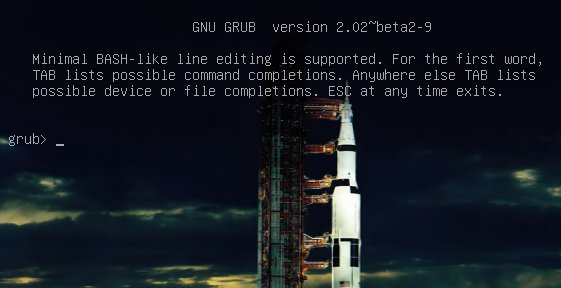
grub command shell
Figure 1: GRUB 2 menu with cool Apollo 17 background.
Once upon a time we had legacy GRUB, the Grand Unified Linux Bootloader version 0.97. Legacy GRUB had many virtues, but it became old and its developers did yearn for more functionality, and thus did GRUB 2 come into the world.
GRUB 2 is a major rewrite with several significant differences. It boots removable media, and can be configured with an option to enter your system BIOS. It's more complicated to configure with all kinds of scripts to wade through, and instead of having a nice fairly simple /boot/grub/menu.lst file with all configurations in one place, the default is /boot/grub/grub.cfg. Which you don't edit directly, oh no, for this is not for mere humans to touch, but only other scripts. We lowly humans may edit /etc/default/grub, which controls mainly the appearance of the GRUB menu. We may also edit the scripts in /etc/grub.d/. These are the scripts that boot your operating systems, control external applications such as memtest and os_prober, and theming./boot/grub/grub.cfg is built from /etc/default/grub and /etc/grub.d/* when you run the update-grub command, which you must run every time you make changes.
The good news is that the update-grub script is reliable for finding kernels, boot files, and adding all operating systems to your GRUB boot menu, so you don't have to do it manually.
We're going to learn how to fix two of the more common failures. When you boot up your system and it stops at the grub> prompt, that is the full GRUB 2 command shell. That means GRUB 2 started normally and loaded the normal.mod module (and other modules which are located in /boot/grub/[arch]/), but it didn't find your grub.cfg file. If you see grub rescue> that means it couldn't find normal.mod, so it probably couldn't find any of your boot files.
How does this happen? The kernel might have changed drive assignments or you moved your hard drives, you changed some partitions, or installed a new operating system and moved things around. In these scenarios your boot files are still there, but GRUB can't find them. So you can look for your boot files at the GRUB prompt, set their locations, and then boot your system and fix your GRUB configuration.

GRUB 2 Command Shell

The GRUB 2 command shell is just as powerful as the shell in legacy GRUB. You can use it to discover boot images, kernels, and root filesystems. In fact, it gives you complete access to all filesystems on the local machine regardless of permissions or other protections. Which some might consider a security hole, but you know the old Unix dictum: whoever has physical access to the machine owns it.
When you're at the grub> prompt, you have a lot of functionality similar to any command shell such as history and tab-completion. The grub rescue> mode is more limited, with no history and no tab-completion.
If you are practicing on a functioning system, press C when your GRUB boot menu appears to open the GRUB command shell. You can stop the bootup countdown by scrolling up and down your menu entries with the arrow keys. It is safe to experiment at the GRUB command line because nothing you do there is permanent. If you are already staring at the grub> or grub rescue>prompt then you're ready to rock.
The next few commands work with both grub> and grub rescue>. The first command you should run invokes the pager, for paging long command outputs:
grub> set pager=1
There must be no spaces on either side of the equals sign. Now let's do a little exploring. Type ls to list all partitions that GRUB sees:
grub> ls
(hd0) (hd0,msdos2) (hd0,msdos1)
What's all this msdos stuff? That means this system has the old-style MS-DOS partition table, rather than the shiny new Globally Unique Identifiers partition table (GPT). (See Using the New GUID Partition Table in Linux (Goodbye Ancient MBR). If you're running GPT it will say (hd0,gpt1). Now let's snoop. Use the ls command to see what files are on your system:
grub> ls (hd0,1)/
lost+found/ bin/ boot/ cdrom/ dev/ etc/ home/  lib/
lib64/ media/ mnt/ opt/ proc/ root/ run/ sbin/ 
srv/ sys/ tmp/ usr/ var/ vmlinuz vmlinuz.old 
initrd.img initrd.img.old
Hurrah, we have found the root filesystem. You can omit the msdos and gpt labels. If you leave off the slash it will print information about the partition. You can read any file on the system with the cat command:
grub> cat (hd0,1)/etc/issue
Ubuntu 14.04 LTS \n \l
Reading /etc/issue could be useful on a multi-boot system for identifying your various Linuxes.

Booting From grub>

This is how to set the boot files and boot the system from the grub> prompt. We know from running the ls command that there is a Linux root filesystem on (hd0,1), and you can keep searching until you verify where /boot/grub is. Then run these commands, using your own root partition, kernel, and initrd image:
grub> set root=(hd0,1)
grub> linux /boot/vmlinuz-3.13.0-29-generic root=/dev/sda1
grub> initrd /boot/initrd.img-3.13.0-29-generic
grub> boot
The first line sets the partition that the root filesystem is on. The second line tells GRUB the location of the kernel you want to use. Start typing /boot/vmli, and then use tab-completion to fill in the rest. Type root=/dev/sdX to set the location of the root filesystem. Yes, this seems redundant, but if you leave this out you'll get a kernel panic. How do you know the correct partition? hd0,1 = /dev/sda1. hd1,1 = /dev/sdb1. hd3,2 = /dev/sdd2. I think you can extrapolate the rest.
The third line sets the initrd file, which must be the same version number as the kernel.
The fourth line boots your system.
On some Linux systems the current kernels and initrds are symlinked into the top level of the root filesystem:
$ ls -l /
vmlinuz -> boot/vmlinuz-3.13.0-29-generic
initrd.img -> boot/initrd.img-3.13.0-29-generic
So you could boot from grub> like this:
grub> set root=(hd0,1)
grub> linux /vmlinuz root=/dev/sda1
grub> initrd /initrd.img
grub> boot

Booting From grub-rescue>

If you're in the GRUB rescue shell the commands are different, and you have to load thenormal.mod andlinux.mod modules:
grub rescue> set prefix=(hd0,1)/boot/grub
grub rescue> set root=(hd0,1)
grub rescue> insmod normal
grub rescue> normal
grub rescue> insmod linux
grub rescue> linux /boot/vmlinuz-3.13.0-29-generic root=/dev/sda1
grub rescue> initrd /boot/initrd.img-3.13.0-29-generic
grub rescue> boot
Tab-completion should start working after you load both modules.

Making Permanent Repairs

When you have successfully booted your system, run these commands to fix GRUB permanently:
# update-grub
Generating grub configuration file ...
Found background: /usr/share/images/grub/Apollo_17_The_Last_Moon_Shot_Edit1.tga
Found background image: /usr/share/images/grub/Apollo_17_The_Last_Moon_Shot_Edit1.tga
Found linux image: /boot/vmlinuz-3.13.0-29-generic
Found initrd image: /boot/initrd.img-3.13.0-29-generic
Found linux image: /boot/vmlinuz-3.13.0-27-generic
Found initrd image: /boot/initrd.img-3.13.0-27-generic
Found linux image: /boot/vmlinuz-3.13.0-24-generic
Found initrd image: /boot/initrd.img-3.13.0-24-generic
Found memtest86+ image: /boot/memtest86+.elf
Found memtest86+ image: /boot/memtest86+.bin
done
# grub-install /dev/sda
Installing for i386-pc platform.
Installation finished. No error reported.
When you run grub-install remember you're installing it to the boot sector of your hard drive and not to a partition, so do not use a partition number like /dev/sda1.

But It Still Doesn't Work

If your system is so messed up that none of this works, try the Super GRUB2 live rescue disk. The official GNU GRUB Manual 2.00 should also be helpful.

Monday, June 29, 2015

Marc Lemay's Curriculum Vitae

Marc Lemay
Programmer Analyst
Phone: 450-661-4602         E-mail: Lemay.Marc@gmail.com
 View my LinkedIn profile
 My Portfolio
My career portfolio: marclemayportfolio.blogspot.ca/


PROFILE

  • Programmer mastering the art of writing excellent, well commented, and efficient code.
  • Worked in several small organizations and also for a multinational enterprise with a larger development team.
  • Solid experience in 3D computer graphics on Silicon Graphics workstations.
  • Expert in geometry and mathematics in general: linear algebra, differential and integral calculus, discrete mathematics, statistics and probabilities.
  • Bilingual, can speak, read and write in both French and English.
  • Long experience in SR&ED - Scientific Research and Experimental Development - Good at trying to solve difficult problems and writing reports for tax credits.
  • Good technical writer and communicator.
  • Enjoy working in a team environment. Can also work independently.
  • Love to share wisdom about computers and Internet technologies.

TECHNICAL SKILLS

Applications:      CAD/CAM (computer-aided design and computer-aided manufacturing), Transport, Manufacturing, Accounting, Server‑Client app., Information Technology

Platforms:           UNIX (SGI IRIX, IBM AIX, Linux), Windows, VAX VMS

Languages:         C, C++, Java, JSP, Visual Basic, SQL, Informix 4GL, Assembly (Intel, Motorola, MIPS)

Scripts:               PHP, JavaScript, bash, tcsh, Perl

RDBMS:            Informix, Oracle, IBM DB2, MySQL, MS SQL Server, MS Access

Tools:                 MS Office, Photoshop, GIMP, MS Visual Studio, NetBeans, Eclipse, WebSphere, Struts/Tiles, Movie Maker, kdenlive, Oracle VM VirtualBox
Google Apps: Docs, Drive, Earth, Search, Maps, Sites, Blogs, Google+

Networking:       TCP/IP, UDP/IP, HTTP, HTML, CSS, XML, Apache and Tomcat web servers, NFS, Samba, DNS, DHCP, FTP, SMTP, JavaMail, SSL (Secure Sockets Layer), WireShark packet sniffer, iptables firewall, router configuration and port forwarding

PROFESSIONAL EXPERIENCE

MLC - Marc Lemay Consultant, 2006 - present

Freelance consultant performing software development, troubleshooting, and training.

GIE Technologies Inc., 2006 - 2010

Engineering Firm Evaluating Infrastructures
Jobs/Tasks: Developing and documenting C++ applications.
Projects:
Ø       ICS - The Image Capture System
Mobile vision system with FireWire cameras and other components to survey highway infrastructures.
Ø       The Image Post-Processor
A program to convert in JPEG, GIF, TIFF, and other formats, the raw images acquired by ICS.
Ø       TLPS - The Transverse Laser Profiling System
A system of high performance 3D laser profilers that are able to measure complete transverse road profiles with 1mm resolution at highway speeds to detect cracks, potholes, and measure ruts.
Publication:
Co-written an article about the Image Capture System
http://www.ptgrey.com/case-study/id/10383

Vortex International, 2005

Aquatic Structures Manufacturer
Projects:
Ø       Modified/Improved a Bill of Material (BOM) system implemented in MS Access.
Ø       Transferred the BOM data to a new system programmed in COBOL and using a MS SQL Server.
Ø       Added new reports to the system using Crystal Reports.

The Canadian National Railway (CN), 1999 -2004

North America's Railroad
Projects:
Ø       MPS - The Motive Power (or locomotive management) System
o        Added in MPS the IC (Illinois Central Railroad) after the CN acquired it.
o        Debugged MPS and added new functionalities to it.
o        Improved MPS database access speed by implementing RPC (Remote Procedure Call) with UNIX daemons in a client/server model on the WAN.
Ø       PMRC - The Performance Monitoring and Rule Compliance Database Loader
Created and documented a super fast application to import data to an IBM DB2 database running on an IBM AIX server.
Jobs/Tasks:
Ø       Programming, improving, debugging, documenting
Ø       Analysing and proposing improvements to existing systems.
Ø       Knowledge transfer to CN IT permanent employees

D.P. Digital Precision Inc., 1987 - 1999

High Precision Wire EDM Machining Services
Projects:
Ø       NP3 - The New Profil Compiler
A programming language based on IBM APT with full geometry computing features.
Ø       Japax, Mitsubishi, and Charmilles F45 Post-Processors
Ø       Utilities for plotting on Tektronik and HP LaserJet plotters and printers
Ø       Toolpath Generator for 2-5 axis CNC integrated in the CAD program ICEM/DDN
Ø       DP Expert
Ø       Many other projects:  All detailed on 67 pages in my portfolio if you are interested.
Jobs/Tasks:
Ø       Programming/developing and documenting applications
Ø       Scientific Research and Experimental Development - Wrote reports for tax credits
Ø       Training employees and knowledge transfer
Ø       Managed a LAN with 15 computers and 14 CNC

La Maison de l’ordinateur inc., 1983 - 1987

Computer Store Selling Software and Hardware
Jobs/Tasks:
Ø       Sales representative for Apple Computers
Ø       Part-time Manager

EDUCATION AND TRAINING

B.Sc.A. - 1994            University of Quebec in Montreal (UQAM)
                                    Bachelor of Science in Computer Sciences and IT Management.
D.E.C. - 1987              Montmorency College in Laval
                                    Computer Science Technology
D.E.S. - 1983              College Laval in Laval
                                    General high school diploma
2005-2006                   Training in Java EE (13 months) at Richard & Associates.
                                    Developed an application using the WebSphere IDE,
                                    Struts/Tiles, IBM DB2 to store the persistent data on a server.

Saturday, April 18, 2015

Traquage sur Internet

Traque interdite : ils sont nombreux à vous épier sur le web

Sandra Rodriguez
Sandra Rodriguez     Photo : Radio-Canada/Michel Harvey
Le webdocumentaire Traque interdite, lancé cette semaine, propose une incursion dans l'ensemble des logiciels qui emmagasinent de l'information sur les internautes. On sait que les publicitaires collectent des données sur les internautes, mais pas que les traces que ces derniers laissent sont accessibles à beaucoup plus de personnes que les publicitaires. Matthieu Dugal en discute avec l'une des réalisatrices du webdocumentaire et chercheuse dans le domaine, Sandra Rodriguez.

Science et technologie
Nos traces laissées sur le web
Le samedi 18 avril 2015

Bande annonce


Image tirée de la série documentaire Traque interdite avec réalisatrice Sandra Rodriguez
Image tirée de la série documentaire Traque interdite avec réalisatrice Sandra Rodriguez     Photo : ONF
Lancé récemment, le webdocumentaire Traque interdite fait déjà beaucoup réagir. Produit entre autres par l'Office national du film, il offre à l'internaute de voir ce qu'on lui cache généralement, soit les traces qu'il laisse lorsqu'il navigue. Dans sa chronique « Sous le net » au Téléjournal, Matthieu Dugal explique comment nous sommes constamment épiés sur Internet.

À mi-chemin entre le site web et le documentaire traditionnel, Traque interdite invite l'internaute à suivre le documentariste dans cette expérience afin qu'il puisse voir les traces qu'il laisse derrière lui lorsqu'il navigue sur le web. Il est possible d'être plus anonyme, mais non sans difficulté. Le but de cette traque pour les commerçants est de connaître nos goûts et nos sujets de prédilection pour mieux nous cibler en tant que consommateur. De plus, personne ne sait ce qu'il advient de ces données de masse, ce qu'on appelle le big data. Une chose est certaine, l'enjeu monétaire est important. En 2014, le site YouTube a fait 5 milliards de dollars avec les publicités. Celles publiées sur Facebook rapporteront autant d'ici 2017.

Un lien vers un blogue sur l'ONF

Reprenez le contrôle de votre identité numérique grâce à Traque interdite.

Sunday, March 29, 2015

Having a Ubuntu Root Account with a Password

Where is the Root Account Now?

Recently, I have installed and been using Ubuntu. That's a very popular Linux distribution.

You see, I'm an old UNIX geek and I have found out that these new Linux distributions are now much more simpler to install.  It is as simple as installing a Windows 7 operating system.

This is very good for the ordinary personal computer user. They ask you only the language you wish to use, they also want to know your time zone, and finally, you create a user with a password.

This user will have administrative privileges, after a successful authentication, when required by some operations.

Though sometimes, you really want to become root, the Super User, to perform modifications in your system. Otherwise, you will need to prefix every administrative commands with sudo and type your password every time administrative credentials are required. This can be a pain if you have several commands to execute as root.

To create a root account with a password, you need to do this once:

Figure 1 - Giving a new password to root


As you can see in the above terminal, you proceed like this:
  1. sudo su
  2. Enter the password for marc in this case - he is a system administrator.
  3. Then, use the command passwd - to change the root password.  You can also type passwd root if you want to be more explicit.
  4. Type two times the new password for root.
  5. And voilà!
Note: The passwords are not echoed in the terminal for security reasons.

Saturday, March 28, 2015

Diagnosing and addressing Wi-Fi signal quality problems

I have found a very nice article that demystifies the Wi-Fi signal, noise, and quality measurements to better understand the information displayed by monitoring tools such as KSysGuard on my Linux system like we see in this picture:
Picture 1: Wi-Fi Quality, Signal, and Noise Monitoring.
Picture 1: Wi-Fi Quality, Signal, and Noise Monitoring with KSysGuard, a Linux System Monitor Utility.

The link to the complete article from CNET is written below:

Wi-Fi signal dropouts can be from computer and router configuration problems, but also from physical interference.


Archived Post

In case the post is removed from the Web, I have copied it here for future reference as a backup measure.


For the most part Wi-Fi technology works quite well to keep your Mac, iPhone, and other devices connected; however, there are times when certain devices or setups may be plagued with Wi-Fi dropouts.
Recently I covered a number of approaches to fixing Wi-Fi dropout problems, though these only covered the configuration options in the router and the computer itself. Besides the system configuration, an cause for Wi-Fi drop-outs can also be poor Wi-Fi signal quality.

Wi-Fi error icons
When Wi-Fi drop-outs happen, you may see one of these symbols in the OS X menu bar.Apple

The quality for any analog signal, be it electrical, optical, or radio, can be determined by comparing the desired signal level to the background noise level in the signal in what's known as a signal-to-noise ratio.
In all analog connections you have a certain amount of unwanted signal called "noise," which is a combination of interference from other electrical devices and the innate "fuzziness" of the output. For example, if you turn on a cheap stereo player and crank up the volume without playing anything, you will likely hear a bit of static "white noise" in the background. This innate noise in the signal comes from the quality of the electronics in the player itself. In addition to this noise, you may hear a humming or buzzing sound, which is interference from other electrical devices that is being picked up by the player's electronics.
When you play music (a desired signal), this background noise is usually drowned out because the signal for the music is far greater than the unwanted noise signals; however, this is not always the case. If you are listening to music over the radio, then static and interference from other radio waves can at times be so great that you cannot make sense of the desired audio signal from the noise. In this case either the desired signal is too weak, or the noise signals are too strong and the radio cannot filter them out or otherwise manage them, resulting you hearing a garbled mess.
These examples deal with audio, but Wi-Fi waves work in a similar manner, where background noise can result in the inability for the computer to understand the desired signal, especially when the signal is weak. Therefore, to determine the Wi-Fi signal quality you need to be able to compare the data and noise signals that your computer's radio is picking up.
The Wi-Fi receiver on your computer is constantly measuring both the desired signal strength and the noise signal strength, and if you are experiencing connectivity problems, you can use a tool that will display these measurements for you. On Mac systems running OS X Lion, Apple has included a program called Wi-Fi Diagnostics Utility (available in the /System/Library/CoreServices/ folder) that can do this, but if you have other versions of OS X, then you can use a third-party tool such as APGrapher, AirRadar, iStumbler, or Kismac.

High signal strength
Moving a computer near the router will give a much higher signal-to-noise ratio by increasing the received signal strength, even though the noise does not change.Screenshot by Topher Kessler

In the tool you can monitor the Wi-Fi performance, and see the graphed signal and noise power levels, which in most cases will be negative numbers. This may seem odd, but is correct because the measurement of the wireless signal in watts is converted to a logarithmic ratio unit called dBm, which is the ratio of the measured signal to one milliwatt of power. If the signal is greater than one milliwatt, the dBm measurement will be positive, and if the signal is less than one milliwatt, then the ratio will be negative (logarithms of values between 0 and 1 are negative).
For most Wi-Fi networks, you will see the signal measurement be between around -10 and -70 dBm, and should see the noise between -80 to -100 dBm. In these, the more negative the number is, the smaller its signal is.
The overall power of either the signal or the noise level does not matter; instead, what matters is the ratio of these two. If the desired signal is too weak, then it will fall into the noise and make it hard to distinguish. On the other hand, if the noise level gets too large, then it can also encroach on the desired signal level and likewise make it harder to distinguish. In both cases the ratio of signal-to-noise level gets smaller and the quality of the signal goes down.
What happens when signal to noise ratio is low?

Low signal-to-noise ratio
Interference or weak signal strength can cause a low signal-to-noise ratio, resulting in slow connections or dropped connections (arrows).Screenshot by Topher Kessler

Digital data such as that sent over a Wi-Fi signal is sent in packets, each of which is checked for integrity and assembled with other received packets to complete the data stream. This process ensures the data is kept intact; however, it does not overcome the fact that the digital data must always be transmitted over a physical analog signal (air, light, electromagnetism, etc.).
If the physical analog signal carrying the data degrades in quality, then the computer listening to the signal will have a harder time receiving intact packets that it can understand, and the system will spend a lot of time discarding incomplete packets and waiting for them to be resent over the poor-quality analog signal.
Therefore, as the analog Wi-Fi signal quality degrades, the first thing that happens is the speed of the connection drops since the system spends more time asking for duplicate packets than it spends steadily receiving them. As the signal quality degrades further, the system will have a much more difficult time maintaining other aspects of the connection than just the data stream, and you will begin to see the computer lose its handshake with the router, resulting in a dropped connection.

Speed quality
If the signal quality is low (left), the speed of the connection will be much slower. As the quality improves, the connection speed will increase.Topher Kessler

How do you fix a low signal-to-noise ratio?
The approach to fixing Wi-Fi signal quality problems depends on which aspect of the signal-to-noise ratio is not in its expected range. If your measurement of the signal power levels shows the "Signal" component being relatively low (around -70dBm), then you will need to find a way to boost this signal, which can normally be done with one of these methods:
  1. Move closer to the source
    Signal levels will attenuate more the further you get from the source of the signal, so try moving closer to your Wi-Fi router to see if the signal level increases.

  2. Increase the radio power
    Many routers have an option for adjusting the Wi-Fi signal level, so consult your router manual to see about increasing this level. Not only will doing this increase your router's range, but it will also increase the quality of the signal and therefore increase your average connection speed (with the router, and not necessarily the internet).

  3. Remove obstructions
    The signal from the router may be grounded by large metal devices between your computer and the router. Therefore, if your computer is situated in an area with obstructions between you and the router, then try moving to an area where you have a clear path to the router. Sometimes piping or electrical wiring in walls can be enough to ground and attenuate the signal being sent to your system.

Noise spike
Sudden energy pulses from appliances can cause large noise spikes. In this case a refrigerator turning on results in a large noise spike that can cause a data stream pause even if the connection does not drop.Screenshot by Topher Kessler

If you find that the signal is high (-60 to -10dBm), but the measured noise level is also high (above around -75dBm), then in addition to the three suggestions mentioned above try checking for any active electronics around either your computer or the router, and remove them. Large appliances can generate massive amounts of electromagnetic energy that can disrupt the low-power signals in Wi-Fi connections. Even if the energy from appliances does not cause steady interference, it can result in periodic spikes that can cause a connection dropout, especially when the appliance is turned on or off.
Beyond managing the physics of the Wi-Fi connection, you can also many times address connectivity problems in software. If there are firmware updates available for either your router or the Wi-Fi adapter in your system (Apple releases these as EFI Firmware updates), then apply them, as they can sometimes fix a poorly managed hardware device that results in degraded signal quality. In addition to firmware updates, check for software driver or operating system updates for your system, since these can affect how the system interprets the power levels measured in the Wi-Fi adapter.


Questions? Comments? Have a fix? Post them below or e-mail us!
Be sure to check us out on Twitter and the CNET Mac forums.

Tuesday, March 24, 2015

Parser Example

This is an Example of a Parser Written in C

The way the parser works, it reads one character at a time from an input stream. It skips separators (spaces, tab characters, etc...) until it sees a 'letter' or 'detector character'. It reads the token and identify it from a list of known keywords and stores a corresponding integer value into an array.

If the token starts with a number, a parenthesis, a sign, or the first letter is a token for a previously defined variable name, then the parser will evaluate (compute) the value of the mathematical expression, with order of precedence, and identify it as an expression with a corresponding value.


ARITHMETIC EXPRESSIONS
     At any place where a numerical value is expected, it is possible to
     supply an arithmetic expression.

     To construct the expression, the following operators are available:
       ^    : power elevation              (Utter most precedence)
       *, / : multiplication, division     (high precedence)
       +, - : addition, subtraction        (low precedence)

     Also, some functions are available:
      abs(arg)  Returns the absolute value of arg.
      sin(arg)  Returns the sine of arg (arg is spec in degrees).
      cos(arg)
      tan(arg)
      asin(arg)
      acos(arg)
      atan(arg)
      sqr(arg)  Returns the square of arg.
      sqrt(arg) Returns the square root of arg.

     Arithmetic expressions can include variables.  To create a variable, you
     simply assign a value to it.  For example:

        x = 4+3              # x = 7
        y = sin(30)+x        # y = 7.5
        y = -y/2             # y = -3.75
        pi = 4*atan(1)       # pi = 3.14159265358979323846...

      You can use any name for a variable as long as it is not a function
      name (i.e. 'sin') or a command name (like 'quit').

      You cannot insert space characters in an expression because they are
      used as token separator.

It implements the following scripting language:
DTP Command Language


/mnt/archives/archives/to_class/Archives_part2/Windows/dp/unix/src/dtp/parser.c.html
  1 #include <stdio.h>
  2 #include <string.h>
  3 #include <ctype.h>
  4 #include <stdlib.h>
  5 #include <math.h>
  6 #include <unistd.h>
  7 
  8 #include "parser.h"
  9 
 10 /* #define MSDOS */
 11 
 12 typedef unsigned int         UINT;
 13 typedef enum { FALSE, TRUE } BOOLEAN;
 14 
 15 /****************************************************/
 16 /*               Variable for DTP                   */
 17 /****************************************************/
 18 #define DRAW       100
 19 #define QUIT       101
 20 #define UNITS      102
 21 #define ORIGIN     103
 22 #define ZOOM       104
 23 #define HELP       105
 24 #define TRANSLATE  106
 25 #define ROTATE     107
 26 #define FIT        108
 27 #define PREVIEW    109
 28 #define OUTPUT     110
 29 #define SOURCE     111
 30 #define PRINT      113
 31 #define ASSIGN     114
 32 #define CLS        115
 33 #define LOAD       116
 34 #define EXPR       117
 35 #define VAR        118
 36 #define MACH       119
 37 #define OFF        120
 38 #define OFFTAB     121
 39 #define IN         122
 40 #define MM         123
 41 #define ISO        124
 42 #define HP         125
 43 #define TEK        126
 44 #define SELECT     127
 45 #define CLEARANCE  128
 46 #define LOWERCASE_Z 129
 47 #define UPPERCASE_Z 130
 48 #define ZZ         131
 49 #define VERIFY     132
 50 #define APPEND     133
 51 #define CLEAR      134
 52 #define Z          135
 53 #define XY         136
 54 #define ON         137
 55 #define REPORT     138
 56 #define HPA        139
 57 #define REGIME     140
 58 #define DUMP       141
 59 #define CENTER     142
 60 #define WINDOW     143
 61 #define CLIP       144
 62 #define FRAME      145
 63 #define CHANGEDIR  146
 64 #define YES        147
 65 #define NO         148
 66 #define FLUSH      149
 67 #define DRAWAXIS   150
 68 #define TRACE      151
 69 #define DISPLAY    152
 70 #define PARTNAME   153
 71 #define LENGTH     154
 72 #define REFERENCE  155
 73 #define KEEP       156
 74 #define UNDO       157
 75 #define HISTORY    158
 76 #define STEPS      159
 77 #define UNDEF      999
 78 
 79 unsigned num_expr;
 80 double exprval[16];
 81 unsigned num_undef;
 82 char undef_str[16][80];
 83 
 84 #define NUMROUT  75
 85 #define MAXTOKEN 10
 86 unsigned int syntax[NUMROUT][MAXTOKEN] = {
 87 {DRAW,NULL},
 88 {DRAW,EXPR,NULL},
 89 {DRAW,LOWERCASE_Z,EXPR,EXPR,NULL},
 90 {DRAW,UPPERCASE_Z,EXPR,EXPR,EXPR,NULL},
 91 {DRAW,ZZ,NULL},
 92 {VERIFY,NULL},
 93 {VERIFY,EXPR,NULL},
 94 {VERIFY,LOWERCASE_Z,EXPR,EXPR,NULL},
 95 {VERIFY,UPPERCASE_Z,EXPR,EXPR,EXPR,NULL},
 96 {VERIFY,ZZ,NULL},
 97 {QUIT,NULL},
 98 {ZOOM,EXPR,NULL},
 99 {LOWERCASE_Z,EXPR,NULL},
100 {ZOOM,EXPR,EXPR,EXPR,NULL},
101 {LOWERCASE_Z,EXPR,EXPR,EXPR,NULL},
102 {CLS,NULL},
103 {ISO,UNDEF,NULL},
104 {ISO,NULL},
105 {PREVIEW,NULL},
106 {UNDEF,ASSIGN,EXPR,NULL},
107 {VAR,ASSIGN,EXPR,NULL},
108 {HELP,NULL},
109 {SOURCE,UNDEF},
110 {MACH,EXPR,NULL},
111 {OFF,EXPR,NULL},
112 {OFFTAB,UNDEF,NULL},
113 {TRANSLATE,EXPR,EXPR,NULL},
114 {UNITS,IN,NULL},
115 {UNITS,MM,NULL},
116 {UNITS,XY,IN,NULL},
117 {UNITS,XY,MM,NULL},
118 {UNITS,LOWERCASE_Z,IN,NULL},
119 {UNITS,LOWERCASE_Z,MM,NULL},
120 {ORIGIN,EXPR,EXPR,NULL},
121 {SELECT,HP,NULL},
122 {SELECT,TEK,NULL},
123 {LOAD,UNDEF,NULL},
124 {CLEARANCE,EXPR,NULL},
125 {APPEND,YES,NULL},
126 {APPEND,NO,NULL},
127 {REPORT,YES,NULL},
128 {REPORT,NO,NULL},
129 {HPA,EXPR,NULL},
130 {REGIME,EXPR,NULL},
131 {DUMP,NULL},
132 {CENTER,YES,NULL},
133 {CENTER,NO,NULL},
134 {CENTER,KEEP,NULL},
135 {WINDOW,EXPR,EXPR,EXPR,EXPR,NULL},
136 {CLIP,YES,NULL},
137 {CLIP,NO,NULL},
138 {FRAME,YES,NULL},
139 {FRAME,NO,NULL},
140 {CHANGEDIR,UNDEF,NULL},
141 {FLUSH,NULL},
142 {CLEAR,NULL},
143 {DRAWAXIS,NULL},
144 {DRAWAXIS,EXPR,NULL},
145 {DRAWAXIS,LOWERCASE_Z,EXPR,EXPR,NULL},
146 {DRAWAXIS,UPPERCASE_Z,EXPR,EXPR,EXPR,NULL},
147 {DRAWAXIS,ZZ,NULL},
148 {TRACE,YES,NULL},
149 {TRACE,NO,NULL},
150 {DISPLAY,PARTNAME,YES,NULL},
151 {DISPLAY,PARTNAME,NO,NULL},
152 {DISPLAY,LENGTH,YES,NULL},
153 {DISPLAY,LENGTH,NO,NULL},
154 {DISPLAY,REFERENCE,YES,NULL},
155 {DISPLAY,REFERENCE,NO,NULL},
156 {UNDO,NULL},
157 {UNDO,EXPR,NULL},
158 {HISTORY,NULL},
159 {DISPLAY,STEPS,YES,NULL},
160 {DISPLAY,STEPS,NO,NULL},
161 {NULL}
162 };
163 
164 /* Holds the token of a parsed line */
165 unsigned int pline[MAXTOKEN];
166 unsigned int num_pline;
167 
168 VAR_TREE *var_tree_root = NULL;
169 
170 BOOLEAN very_first_token = TRUE;
171 
172 #define istoken(c) (isalpha(c) || c == '_' || c == '=' || c == '.' || isdigit(c) ||\
173                     ((!very_first_token && (pline[0] == CHANGEDIR || pline[0] == ISO)) ? c == '/' : c == '='))
174 
175 
176 /* PROTOTYPES */
177 VAR_TREE *isvar (VAR_TREE *root, char *name);
178 void print_var (VAR_TREE *root);
179 signed int isfunc (char *funcname);
180 signed int isresword (char *resword);
181 double evalfunc (double funcarg, signed int functag);
182 void init_finfo (void);
183 int nextc (FILE *stream);
184 int __getc (FILE *stream);
185 char *gettoken (FILE *stream);
186 double getnum (FILE *stream);
187 double getfactor (FILE *stream);
188 double getpower (FILE *stream);
189 double getterm (FILE *stream);
190 double getexpr (FILE *stream);
191 signed ident_routine (unsigned *pline);
192 BOOLEAN syntaxcmp (unsigned *a, unsigned *b);
193 
194 void def_var (VAR_TREE **root, char *name, double val)
195 {
196   if (*root == NULL) {
197     *root = (VAR_TREE *)malloc(sizeof(VAR_TREE));
198     strcpy((*root)->name,name);
199     (*root)->val = val;
200     (*root)->left = (*root)->right = NULL;
201   }
202   else if (strcmp(name,(*root)->name)<0)
203     def_var(&(*root)->left,name,val);
204   else if (strcmp(name,(*root)->name)>0)
205     def_var(&(*root)->right,name,val);
206   else {
207     /*
208     fprintf(stderr,"Warning: Variable '%s' redefined. \
209 Old value was %lf, new is %lf\n",name,(*root)->val,val);
210     */
211     (*root)->val = val;
212   }
213 }  /* end of def_var */
214 
215 VAR_TREE *isvar (VAR_TREE *root, char *name)
216 {
217   if (root == NULL)
218     return(NULL);
219   else if (strcmp(name,root->name)<0)
220     return(isvar(root->left,name));
221   else if (strcmp(name,root->name)>0)
222     return(isvar(root->right,name));
223   else
224     return(root);
225 }  /* end of isvar */
226 
227 void print_var (VAR_TREE *root)
228 {
229   if (root == NULL)
230     return;
231   print_var(root->left);
232   printf("\033[1m%s\033[0m = %lf\n",root->name,root->val);
233   print_var(root->right);
234 }
235 
236 double PI_over_180 = M_PI/180;
237 #define degtorad(theta) (theta * PI_over_180)
238 #define radtodeg(theta) (theta * 180 / M_PI)
239 
240 #define NUMFUNC 11
241 char *funcnames [] = { "abs", "sin", "cos", "tan", "sqr","atan","asin","acos","atn","asn","acs"};
242 signed int isfunc (char *funcname)
243 {
244   unsigned int i = 0;
245   BOOLEAN found = FALSE;
246   signed int functag = -1;
247   do {
248     if (strcmp(funcname,funcnames[i])==0) {
249       functag = i;
250       found = TRUE;
251     }
252     else
253       i++;
254   } while (!found && i < NUMFUNC);
255   return(functag);
256 }  /* end of isfunc */
257 
258 #define NUMRESWORDS 82
259 char *reswords []     = { "draw",   "d",
260                           "quit",   "q",
261                           "units",  "u",
262                           "origin", "or",
263                           "zoom",
264                           "help",
265                           "tr",
266                           "preview", "p",
267                           "source", "s",
268                           "print",
269                           "cls",
270                           "load", "l",
271                           "mach", "m",
272                           "off", "o",
273                           "offtab", "ot",
274                           "in",
275                           "mm",
276                           "iso", "i",
277                           "hp",
278                           "tek",
279                           "select", "sel",
280                           "cl",
281                           "z",
282                           "Z",
283                           "zz",
284                           "verify", "v",
285                           "append", "a",
286                           "xy",
287                           "on",
288                           "report", "rep",
289                           "hpa",
290                           "regime", "reg",
291                           "dump",
292                           "center", "c",
293                           "window", "w",
294                           "clip",
295                           "frame",
296                           "cid",
297                           "yes", "y",
298                           "no", "n",
299                           "flush", "f",
300                           "clear",
301                           "drawaxis", "da",
302                           "trace",
303                           "display","di",
304                           "pn",
305                           "length","len",
306                           "ref","r",
307                           "keep","k",
308                           "undo","un",
309                           "history","h",
310                           "steps", "st",
311                           "="  };
312 signed ressymbols [] = {   DRAW,   DRAW,
313                            QUIT,   QUIT,
314                            UNITS, UNITS,
315                            ORIGIN, ORIGIN,
316                            ZOOM,
317                            HELP,
318                            TRANSLATE,
319                            PREVIEW, PREVIEW,
320                            SOURCE, SOURCE,
321                            PRINT,
322                            CLS,
323                            LOAD, LOAD,
324                            MACH, MACH,
325                            OFF, OFF,
326                            OFFTAB, OFFTAB,
327                            IN,
328                            MM,
329                            ISO, ISO,
330                            HP,
331                            TEK,
332                            SELECT, SELECT,
333                            CLEARANCE,
334                            LOWERCASE_Z,
335                            UPPERCASE_Z,
336                            ZZ,
337                            VERIFY, VERIFY,
338                            APPEND, APPEND,
339                            XY,
340                            ON,
341                            REPORT, REPORT,
342                            HPA,
343                            REGIME, REGIME,
344                            DUMP,
345                            CENTER, CENTER,
346                            WINDOW, WINDOW,
347                            CLIP,
348                            FRAME,
349                            CHANGEDIR,
350                            YES, YES,
351                            NO, NO,
352                            FLUSH, FLUSH,
353                            CLEAR,
354                            DRAWAXIS, DRAWAXIS,
355                            TRACE,
356                            DISPLAY, DISPLAY,
357                            PARTNAME,
358                            LENGTH, LENGTH,
359                            REFERENCE, REFERENCE,
360                            KEEP, KEEP,
361                            UNDO, UNDO,
362                            HISTORY, HISTORY,
363                            STEPS, STEPS,
364                            ASSIGN  };
365 signed int isresword (char *resword)
366 {
367   unsigned int i = 0;
368   BOOLEAN found = FALSE;
369   signed int wordtag = -1;
370   do {
371     if (strcmp(resword,reswords[i])==0) {
372       wordtag = i;
373       found = TRUE;
374     }
375     else
376       i++;
377   } while (!found && i < NUMRESWORDS);
378   if (!found)
379     return(wordtag);
380   else
381     return(ressymbols[wordtag]);
382 }  /* end of isresword */
383 
384 
385 double evalfunc (double funcarg, signed int functag)
386 {
387   switch (functag) {
388     case 0 : return(fabs(funcarg));
389     case 1 : return(sin(degtorad(funcarg)));
390     case 2 : return(cos(degtorad(funcarg)));
391     case 3 : return(tan(degtorad(funcarg)));
392     case 4 : return(sqrt(funcarg));
393     case 5 :
394     case 8 : return(radtodeg(atan(funcarg)));
395     case 6 :
396     case 9 : return(radtodeg(asin(funcarg)));
397     case 7 :
398     case 10: return(radtodeg(acos(funcarg)));
399     case -1 : ;
400   }
401 }  /* end of evalfunc */
402 
403 UINT lnnum;  /* line number */
404 UINT foff;   /* file offset */
405 UINT lnoff;  /* line offset */
406 
407 #define curc(stream) ungetc(getc(stream),stream)
408 
409 int nextc (FILE *stream)
410 {
411   int c;
412   while (c = ungetc(getc(stream),stream), c == '\t')
413     __getc(stream);
414   return(c);
415 }  /* end of nextc */
416 
417 
418 
419 void init_finfo (void)
420 {
421   lnnum = 1;
422   foff  = 0;
423   lnoff = 0;
424 }  /* end of init_finfo */
425 
426 int __getc (FILE *stream)
427 {
428   int c;
429   if ((c=getc(stream))=='\n') {
430     lnnum++;
431     lnoff=0;
432 #ifdef MSDOS
433       foff++; /* count two char. for MSDOS computers */
434 #endif
435   }
436   lnoff++;
437   foff++;
438   return(c);
439 }  /* end of __getc */
440 
441 void ungettoken (char *s, FILE *stream)
442 {
443   unsigned i = strlen(s);
444   foff -= i;
445   lnoff -= i;
446   do {
447     ungetc(s[--i],stream);
448   } while (i > 0);
449 }  /* end of ungettoken */
450 
451 char *gettoken (FILE *stream)
452 {
453   char token[80];
454   unsigned int i = 0;
455   while (istoken(nextc(stream))) {
456     token[i++] = __getc(stream);
457   }
458   token[i] = NULL;
459   return(strdup(token));
460 }  /* end of gettoken */
461 
462 double getnum (FILE *stream)
463 {
464 #define radix 10
465   double       numvalue   = 0;
466   unsigned int unaryminus = FALSE;
467   unsigned int scale      = 0;
468   unsigned int i;
469   if (curc(stream)== '-') {
470     unaryminus = TRUE;
471     __getc(stream);
472   }
473   else
474     if (curc(stream) == '+')
475       __getc(stream);
476   while (isdigit(curc(stream)))
477     numvalue = radix * numvalue + __getc(stream) - '0';
478   if (curc(stream) == '.') {
479     __getc(stream);
480     while (isdigit(curc(stream))) {
481       numvalue = radix * numvalue + __getc(stream) - '0';
482       scale++;
483     }  /* end while */
484     for (i = 1; i <= scale; i++)
485       numvalue /= radix;
486   }
487   if (unaryminus)
488     numvalue = -numvalue;
489   return(numvalue);
490 #undef radix
491 }  /* end of getnum */
492 
493 double getfactor (FILE *stream)
494 {
495   double facval;
496   char *s;
497   VAR_TREE *var_ptr;
498   signed int functag;
499   double funcarg;
500   unsigned int unaryminus = FALSE;
501   if (nextc(stream) == '-') {
502     unaryminus = TRUE;
503     __getc(stream);
504   }
505   else if (nextc(stream) == '+')
506     __getc(stream);
507   if(isdigit(nextc(stream)) || nextc(stream) == '.')
508     facval = getnum(stream);
509   else if (nextc(stream) == '(') {
510     __getc(stream);
511     facval = getexpr(stream);
512     if (nextc(stream) == ')')
513       __getc(stream);
514     else
515       fprintf(stderr,"')' missing in expression.\n");
516   } else if (isalpha(nextc(stream))) {
517     s = gettoken(stream);
518     if ((functag = isfunc(s))!=-1) {
519       if (nextc(stream)=='(') {
520         __getc(stream);
521         funcarg = getexpr(stream);
522         if (nextc(stream) == ')')
523           __getc(stream);
524         else
525           fprintf(stderr,"')' missing of function argument.\n");
526       }
527       else
528         fprintf(stderr,"'(' missing of function argument.\n");
529       facval = evalfunc(funcarg,functag);
530     }
531     else if ((var_ptr = isvar(var_tree_root,s))!=NULL)
532       facval = var_ptr->val;
533     else {
534       fprintf(stderr,"Undefined variable '%s' in expression.\n",s);
535       facval = 0;
536     }
537     free(s);
538   }
539   if (unaryminus)
540     facval = -facval;
541   return(facval);
542 }  /* end of getfactor */
543 
544 double getpower (FILE *stream)
545 {
546   double facval;
547   double exponent;
548   facval = getfactor(stream);
549   while(nextc(stream) == '^') {
550     __getc(stream);
551     exponent = getfactor(stream);
552     facval = pow(facval,exponent);
553   }
554   return(facval);
555 }  /* end of getpower */
556 
557 double getterm (FILE *stream)
558 {
559   double termval;
560   double nextfacval;
561   unsigned int op;
562   termval = getpower(stream);
563   while (nextc(stream) == '*' || nextc(stream) == '/') {
564     op = __getc(stream);
565     nextfacval = getpower(stream);
566     if (op == '*')
567       termval *= nextfacval;
568     else if (op == '/')
569       if (nextfacval != 0)
570         termval /= nextfacval;
571       else
572         fprintf(stderr,"Division by zero\n");
573   }
574   return(termval);
575 }  /* end of getterm */
576 
577 double getexpr (FILE *stream)
578 {
579   double exprval;
580   double nexttermval;
581   unsigned int op;
582   exprval = getterm(stream);
583   while (nextc(stream) == '+' || nextc(stream) == '-') {
584     op = __getc(stream);
585     nexttermval = getterm(stream);
586     if (op == '+')
587       exprval += nexttermval;
588     else
589       exprval -= nexttermval;
590   }
591   return(exprval);
592 }  /* end of getexpr */
593 
594 
595 void print_syntax (void)
596 {
597   unsigned i;
598   printf("pline[");
599   for (i=0; i< num_pline; i++) {
600     printf("%u ",pline[i]);
601   }
602   printf("]");
603 }  /* end of print_syntax */
604 
605 signed parse_cmd (char *cmdfile)
606 {
607   FILE *f;
608   char *s;
609   int c;
610   signed reswordtag;
611   unsigned i;
612   char shellcmd[80];
613   signed idrout;
614   extern char cmdlist_filename[80];
615   extern BOOLEAN undoing;
616 
617 
618   if((f=fopen(cmdfile,"rt"))==NULL) {
619     fprintf(stderr,"Cannot open '%s'.\n",cmdfile);
620     exit(1);
621   }
622 
623   init_finfo();
624   num_pline = 0;
625   num_expr = 0;
626   num_undef = 0;
627   very_first_token = TRUE; /* must be set to TRUE at the start of every line/command */
628   while((c=nextc(f))!=EOF) {
629     if (c == '#' && very_first_token) {
630       /* skip comment */
631       __getc(f); /* skip the '#' */
632       while (c = __getc(f), !(c == '\n ' || c == EOF));
633     }
634     if (c == '!' && very_first_token) {
635       shellcmd[0] = NULL; i = 0; __getc(f);
636       while (c = __getc(f), !(c == '\n ' || c == EOF))
637         shellcmd[i++] = c;
638       shellcmd[i] = NULL;
639 
640       /* restore the terminal to its original size */
641       printf("\033[;r");
642 
643       clear_screen();
644 
645       system(shellcmd);
646 
647       /* pause */
648       printf("\033[1m\033[7mPress any key to return to DTP!\033[0m");
649       fflush(stdout);
650       setraw();
651       keystroke();
652       restore();
653       clear_screen();
654 
655       printf("\033[;20r"); fflush(stdout);
656       print_status();
657 
658     }
659     if (isalpha(c) || c == '_' || c == '=' || c == '.' || c == '/') {
660       s = gettoken(f);
661 
662       if ((reswordtag = isresword(s))!=-1) {
663         if (!very_first_token && pline[0] == SOURCE) {
664           /* This is to permit "source mach" to work. */
665           pline[num_pline++] = UNDEF;
666           strcpy(undef_str[num_undef++],s);
667         }
668         else
669           pline[num_pline++] = reswordtag;
670       }
671       else if (isfunc(s)!=-1) {
672         ungettoken(s,f);
673         exprval[num_expr++] = getexpr(f);
674         pline[num_pline++] = EXPR;
675       }
676       else if (isalpha(c) || isdigit(c) || c == '+' || c == '-' || c == '.' || c == '(' || c == '/') {
677         if (isalpha(c) && isvar(var_tree_root,s)==NULL) {
678           pline[num_pline++] = UNDEF;
679           strcpy(undef_str[num_undef++],s);
680         }
681         else if (very_first_token) {
682           pline[num_pline++] = VAR;
683           strcpy(undef_str[num_undef++],s);
684         }
685         else {
686           if (pline[0] == CHANGEDIR || pline[0] == ISO) {
687             pline[num_pline++] = UNDEF;
688             strcpy(undef_str[num_undef++],s);
689           }
690           else {
691             ungettoken(s,f);
692             exprval[num_expr++] = getexpr(f);
693             pline[num_pline++] = EXPR;
694           }
695         }
696       }
697 
698       c=nextc(f);
699       free(s);
700       very_first_token = FALSE;
701     }
702     else if (isdigit(c) || c == '+' || c == '-' || c == '.' || c == '(') {
703       if (c == '.' && (pline[0] == CHANGEDIR || pline[0] == ISO)) {
704         pline[num_pline++] = UNDEF;
705         strcpy(undef_str[num_undef++],s);
706       }
707       else {
708         exprval[num_expr++] = getexpr(f);
709         pline[num_pline++] = EXPR;
710       }
711     }
712     else
713       __getc(f);
714   }
715   pline[num_pline++] = NULL;
716 /*print_syntax();    */
717 /*print_var(var_tree_root); */
718 
719   if((idrout = ident_routine(pline))!= ROUT_NO_INSTRUCTION &&
720        !undoing && idrout != ROUT_HISTORY && idrout != ROUT_SOURCE
721                                        && idrout != -1/* syntax error*/) {
722     /* add to the list of command the current command */
723     sprintf(shellcmd,"cat %s >> %s;echo | cat >> %s",cmdfile,cmdlist_filename,cmdlist_filename);
724     system(shellcmd);
725   }
726 
727   fclose(f);
728   unlink(cmdfile);
729 
730   return(idrout);
731 
732 }  /* end of parse_cmd */
733 
734 
735 signed ident_routine (unsigned *pline)
736 {
737   unsigned i = 0;
738   while (i < NUMROUT) {
739     if (syntaxcmp(pline,syntax[i]))
740       return(i);
741     i++;
742   }
743   return(-1);
744 }  /* end of ident_routine */
745 
746 
747 BOOLEAN syntaxcmp (unsigned *a, unsigned *b)
748 {
749   unsigned i = 0;
750   while (*(a+i) == *(b+i)) {
751     if (*(a+i) == NULL)
752       return(TRUE);
753     i++;
754   }
755   return(FALSE);
756 }